 Join our Discord
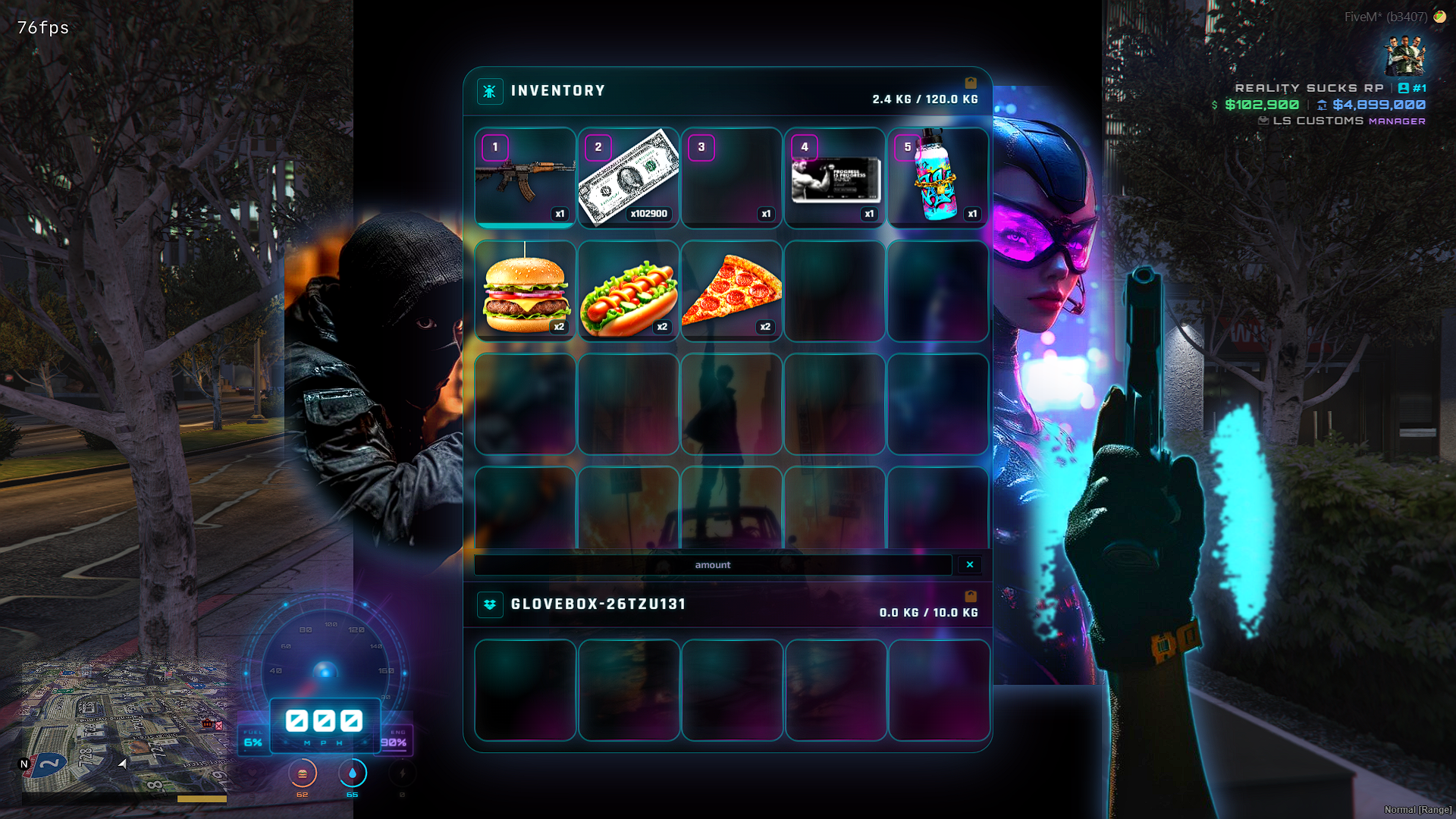
⚡ RealitySucksRP qb-inventory — Custom UI Edition ⚡
RS Punk Inventory
A modern, aggressive inventory built for serious FiveM roleplay
I rebuilt the traditional inventory experience into something that feels more modern, more visual, and better suited for today’s RP servers.
RS Punk Inventory combines a neon cyber-punk presentation with a hardened server-authoritative inventory system designed around real gameplay: cash, weapons, floor drops, vehicle storage, item transfers, and fast day-to-day RP interactions.
The interface is designed to look like part of the game rather than a plain utility menu, while the backend focuses heavily on keeping inventory state accurate between the player, server, HUD, and other resources.
Physical Cash That Actually Works
Cash can exist as a real inventory item while remaining synchronized with the player’s actual spending power.
That means when cash is:
- Given to a player
- Earned from another resource
- Spent at a vehicle shop or business
- Dropped on the ground
- Picked back up
- Added or removed through QBCore money functions
…the cash item, HUD balance, and server-side buying power stay together.
Large cash stacks are also presented naturally inside the inventory:
$34,601,900
instead of an ugly item count such as x34601900.
Hardened Floor Drop System
I also rebuilt the floor-drop synchronization flow to combat one of the most frustrating inventory problems: ghost items and duplicated visual stacks.
Floor drops use authoritative server inventory snapshots instead of trusting the browser to guess what happened.
This helps prevent situations where:
- An item appears in both the inventory and on the floor
- Cash returns after being dropped
- Weapons visually duplicate
- Items disappear until reopening inventory
- Failed moves leave ghost items behind
- Rapid clicking causes overlapping transactions
- A failed floor bag silently eats the item
Drop operations include request locking, duplicate-request protection, reconciliation, and refund protection when a floor bag cannot be completed.
Designed for RP
RS Punk Inventory supports the inventory interactions players expect while keeping the presentation immersive.
Highlights include:
- Neon cyber-punk inventory interface
- Physical cash item support
- Live cash/HUD synchronization
- Server-authoritative cash state
- Currency formatting for large cash stacks
- Weapons and weapon metadata
- Floor item drops
- Glovebox inventory
- Vehicle storage interaction
- Player-to-player item transfers
- Stack splitting and merging
- Inventory weight and slot limits
- Hotbar support
- Server-authoritative move reconciliation
- Duplicate floor-drop protection
- Failed-drop item refunds
- Automatic inventory-state recovery
- Compatibility support for existing qb-inventory style integrations
Built With Stability in Mind
I put special attention into the parts of an inventory system that can cause economy problems.
The server validates important inventory operations and sends the resulting inventory state back to the UI. The interface is then updated from what the server says actually exists, rather than relying only on local drag-and-drop animation.
The result is a much more dependable foundation for servers where cash and items actually matter.
RS Punk Inventory
A high-energy inventory for modern RP servers — built around style, physical cash, authoritative synchronization, and dependable everyday gameplay.
### 🔥 Open Source QBCore Inventory • Custom Menu UI • Cash-as-Item • Weapon Attachments • Server Branding
Bring your server inventory to life with a fully upgraded **QBCore qb-inventory** packed with modern backend improvements, custom menu visuals, server branding, cash-as-item support, weapon inspection, better drops, HUD compatibility, and easy image customization.
This is not just a basic reskin.
This is a polished inventory package built for server owners who want their menu to actually feel custom.
---
## 🎥 Preview / Showcase
📌 Add your preview GIFs or screenshots here:
GIF 1: Opening the inventory menu
GIF 2: Moving items / dropping items
GIF 3: Weapon attachment inspection panel
`GIF 4: Custom menu images / logo showcase`
Recommended GIF size:
`1280x720` or `1920x1080`
Recommended image types:
`PNG`, `WEBP`, or optimized `GIF`
---
## 🚀 Main Features
✅ Full QBCore qb-inventory system
✅ Open source / editable files
✅ Custom menu UI design
✅ 3 adjustable menu art/image slots
✅ Replaceable server logo
✅ Server name / branding support
✅ Rework-style backend upgrades
✅ Cash-as-item support
✅ Improved item move/drop handling
✅ Partial stack drop support
✅ Fixes for ghost / returned consumed items
✅ Weapon hotkey debounce
✅ Weapon hotkey support for weapons marked useable = false
✅ Weapon attachment inspection panel
✅ Attachment removal support
✅ Item decay / freshness support
✅ Server-time sync for expiry logic
✅ Safer player-data syncing
✅ HasItem export support
✅ Optional HUD hide/show when inventory opens
✅ Compatible with HUDs using `SetHUDLifeVisible`
---
## 🎨 Custom Menu UI
This inventory includes a custom visual menu UI with **3 major image slots** that server owners can replace, move, resize, or redesign.
Use the 3 image slots for:
🧟 Zombie artwork
🤖 Cyberpunk characters
🎭 Server mascots
🏙️ City RP branding
🕶️ Gang RP themes
🧙 Dungeon / fantasy themes
🎃 Seasonal events
🚔 Police / criminal themes
💀 Horror themes
⚡ Your own custom server art
The UI is designed so you can make it match your server without touching the inventory brain.
---
## 🖼️ Change the Images / Logo / Server Name
Server owners can customize:
✅ Main menu image 1
✅ Main menu image 2
✅ Main menu image 3
✅ Server logo
✅ Server name
✅ Background art
✅ Watermark image
✅ Image size
✅ Image position
✅ Image opacity
✅ UI colors
Most visual edits are done in:
`html/main.css`
Images are usually inside:
html/images/
`html/*.png`
---
## 🛠️ Safe Files to Customize
For visual edits, you can safely edit:
html/main.css
html/index.html
html/images/
`html/*.png`
Avoid editing these unless you know what you are doing:
client/main.lua
server/main.lua
server/functions.lua
html/app.js
`config/config.lua`
Those files control important inventory logic like item use, hotkeys, drops, cash-as-item, server syncing, and framework behavior.
---
## 💵 Cash-As-Item Support
This inventory supports cash as a real inventory item.
When enabled, players can:
💰 Receive cash as an item
💰 Drop cash on the floor
💰 Pick cash back up
💰 Move cash around inventory
💰 See cash inside the inventory UI
💰 Sync cash with compatible HUDs
Cash-as-item requires the proper QBCore player money integration and a `cash` item inside:
`qb-core/shared/items.lua`
If your server does not want cash as an item, leave it disabled in config.
---
## 🔫 Weapon Attachment Inspection
The inventory includes an upgraded weapon attachment inspection panel.
Players can inspect supported weapons and view attachment categories such as:
🔦 Flashlight
🎯 Optics
🔧 Grip
🔫 Muzzle
📦 Magazine
🎨 Tint / skin
Installed attachments can be displayed in a cleaner visual panel instead of a basic old attachment list.
---
## 🍔 Item Decay / Freshness Support
This inventory includes optional item expiry / freshness support.
Useful for:
🍕 Food decay
🥤 Drinks
🧪 Medical items
🥩 Survival RP items
🧟 Zombie RP loot
⏳ Time-sensitive items
When configured, items can show freshness / expiry information through server-time synced data.
---
## 🧩 HUD Compatibility
This inventory includes an optional HUD hide/show hook.
If your HUD supports a `SetHUDLifeVisible` export, the HUD can automatically hide when inventory opens and return when inventory closes.
Example:
```lua
CustomHUD = {
Enabled = true,
ResourceName = 'your-hud-resource-name',
ExportName = 'SetHUDLifeVisible'
}