 Join our Discord
Live preview: Click Here
RS EMS Radio is a dedicated emergency medical radio system built for EMS, paramedics, rescue teams, fire-medical units, and emergency-response RP.
Designed as more than a basic frequency selector, RS EMS Radio combines a complete handheld-radio interface with EMS-focused unit information, emergency signaling, customizable hardware frames, configurable radio behavior, and support for modern FiveM voice systems.
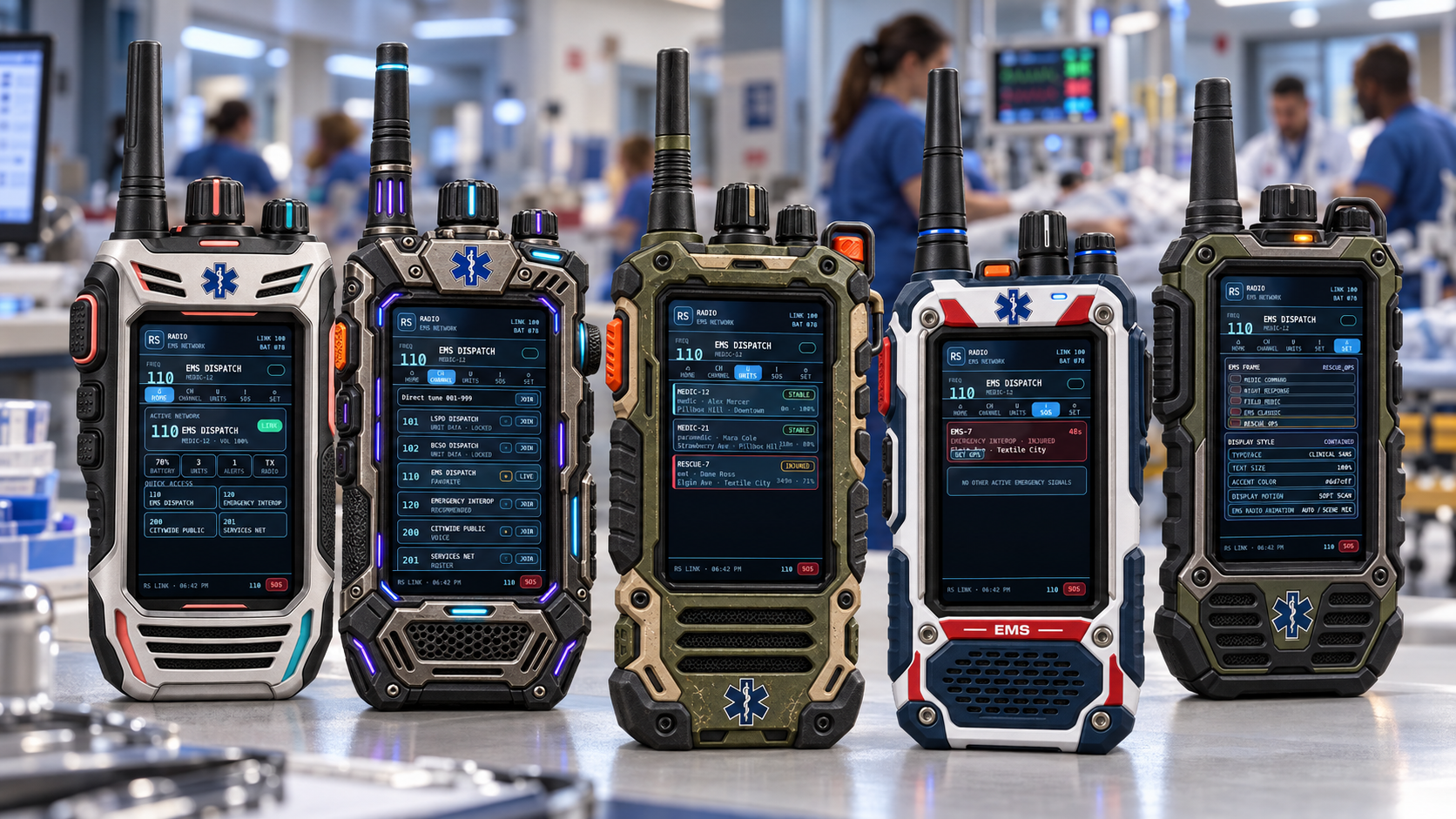
The resource includes five unique EMS radio frames, each using the same functional live radio display while giving players different hardware styles for command, rescue, tactical, and field-medical roles.
Main Features
Full EMS handheld radio interface
Five selectable EMS radio frames
Real interactive radio display
Dedicated EMS frequency network
Channel browser and direct frequency tuning
Quick-access favorite channels
Unit roster
Callsign display
Player signal status
Live radio activity indicators
Talking / transmitting status
Battery display
Radio volume controls where supported
Radio deafen option
Per-player mute support where supported
Emergency / distress signaling
Active emergency signal board
Emergency countdown information
GPS waypoint support for distress locations
Unit condition information
Player location / street information
Distance and signal information
EMS unit health information
Armor information
Heart-rate telemetry
SpO₂ telemetry
Configurable player overlay
Radio position and scale controls
Custom display name support
Display font options
Display text-size control
Accent-color customization
Multiple display backgrounds
Display animation options
Selectable EMS radio holding animations
RF jammer support
Channel allow/block behavior for jammers
Persistent player radio preferences
Server-side validation for important radio actions
Five EMS Radio Frames
Players can select from five included radio designs:
Medic Command — silver dual-tone command radio
Night Response — black tactical frame with cyan/purple accents
Field Medic — rugged olive field-response design
EMS Classic — traditional white, navy, and red EMS styling
Rescue Ops — heavy-duty rescue / tactical EMS frame
Changing the frame changes the physical radio appearance without replacing the underlying radio system.
Radio Pages
The radio contains several functional pages directly inside the device display.
Home
Provides an at-a-glance overview of the active radio connection including:
Current frequency
Channel name
Callsign
Battery level
Connected units
Active alerts
TX / RX state
Quick-access frequencies
Channels
Browse configured radio frequencies and quickly join accessible channels.
Includes:
Direct frequency tuning
Favorite frequencies
Recommended frequencies
Locked-channel indicators
Current live channel status
Voice, roster, and telemetry channel identification
Units
View EMS personnel connected to the active radio network.
Depending on available server information, the radio can display:
Callsign
Character / unit name
EMS role
Current condition
Signal percentage
Approximate distance
Current street / zone
Talking status
Distress status
Unit Detail
Inspect additional information for a selected unit.
Available information can include:
Health
Armor
Heart rate
SpO₂
Radio signal
Distance
Last known position
Unit condition
SOS / Distress
EMS personnel can transmit an emergency distress signal through the radio.
Other authorized units can receive:
Callsign
Frequency
Unit condition
Location
Emergency countdown
GPS waypoint option
This gives EMS teams a dedicated radio-based emergency workflow instead of relying entirely on chat messages or external dispatch UI.
EMS Radio Customization
Players can personalize their radio directly from the Settings page.
Available options include:
EMS frame
Typeface
Text size
Accent color
Display background
Display motion
Radio animation
Volume
Radio deafen
Microphone clicks
Movement while radio is open
Player overlay
Radio scale
Overlay scale
Radio position
Overlay position
EMS Radio Animations
The radio supports selectable EMS-focused held-radio behavior.
Options include:
Automatic scene-based behavior
EMS Radio Standard
EMS Radio Chatter
EMS Scene Check
The automatic option can switch radio behavior depending on the interaction context.
Voice Integration
RS EMS Radio is designed to work with supported FiveM voice environments while keeping radio ownership and channel behavior controlled through the resource.
Available capabilities depend on the active voice provider and can include:
Radio volume
Radio deafen
Per-player mute
Channel communication
Talking state
Radio activity synchronization
The resource is designed to avoid unnecessary ownership conflicts when multiple communication resources exist on the same server.
RF Jammer System
Optional RF interference functionality is included.
Authorized jammer interactions can support:
Deploying a jammer
Adjustable jammer range
Enabling / disabling interference
Allowing selected frequencies through
Blocking the current frequency
Recovering deployed equipment
Radio UI interference indicators
Built for Emergency RP
RS EMS Radio is suitable for:
EMS departments
Fire / Rescue
Paramedic divisions
Search and Rescue
Tactical medical teams
Hospital response teams
Disaster RP
Zombie / survival medical teams
Multi-agency emergency servers
Framework Support
Designed for use across modern FiveM environments with configurable integrations.
Qbox
QBCore
ESX
Standalone configurations
Exact functionality may depend on the framework, voice resource, permissions, and integrations configured by the server owner.
Included
Complete EMS radio resource
Five EMS radio frames
Radio NUI
EMS unit roster system
Distress system
Radio settings system
Radio animation support
RF jammer support
Configuration files
Installation examples
Compatibility documentation
Voice backend documentation
Security documentation
Cfx release documentation
RealitySucksRP
Built for servers that want a dedicated EMS communication experience instead of a generic radio with an EMS skin.
Five frames. One EMS network. Full emergency-response radio functionality.